Beyond Conversion: A Guide to PDF to PDF Tools
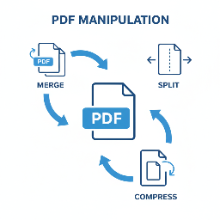
When you think of a "PDF converter," you probably imagine changing a file from one format *to* PDF (like Image to PDF) or from PDF *to* another (like PDF to Image). But what about converting a PDF... to another PDF? This category of tools, which we can call "PDF to PDF converters," is all about modifying and managing existing PDF documents. These utilities are incredibly useful for a wide range of everyday tasks.
Let's explore some of the most common functions of these free online tools.
1. Compressing a PDF
The Problem: You have a PDF file that's too large to send via email or upload to a website with strict file size limits.
The Solution: A PDF compressor analyzes the document and reduces its file size. It does this by optimizing images, removing redundant data, and sometimes slightly lowering the quality of embedded graphics. Most tools offer different levels of compression, allowing you to choose between maximum size reduction and preserving the best quality.
2. Merging PDFs
The Problem: You have several separate PDF files—perhaps a cover letter, a resume, and a portfolio—and you need to submit them as a single, consolidated document.
The Solution: A PDF merger tool allows you to upload multiple PDF files, arrange them in your desired order, and combine them into one seamless, multi-page PDF. This is essential for creating professional and organized submissions.
3. Splitting a PDF
The Problem: You have a large, 100-page report, but you only need to share a specific 5-page chapter with a colleague.
The Solution: A PDF splitter lets you extract specific pages or page ranges from a larger document. You can choose to save each page as a separate PDF or create a new PDF containing only the pages you selected. This is perfect for isolating the exact information you need without sending a bulky, irrelevant document.
4. Organizing and Editing PDFs
The Problem: You've merged several files, but some pages are out of order or in the wrong orientation.
The Solution: Many online PDF tools offer organizational features. These allow you to:
- Reorder pages: Drag and drop thumbnails of your pages into the correct sequence.
- Rotate pages: Fix pages that were scanned upside down or sideways.
- Delete pages: Remove unnecessary or blank pages from your document.
While our main tool at ImageToolbox focuses on images, understanding the world of PDF utilities is crucial for anyone who works with digital documents. These free, browser-based PDF to PDF converters can save you time and help you manage your files with ease and professionalism.