What is an HD Image Converter and Do You Need One?
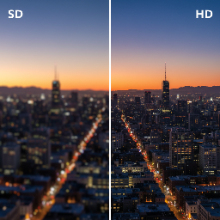
You often hear the term "HD" in relation to televisions and videos, but what does it mean for a still image? The demand for "HD image converters" is rising, but what do these tools actually do? This article will clarify what makes an image "high-definition" and explore the tools that can help you achieve that level of quality.
What is an "HD Image"?
Unlike video, there isn't a strict technical standard that defines an image as "HD." Generally, the term is used to describe images that are high-resolution, sharp, and clear. An HD image has:
- High Pixel Dimensions: The image has a large width and height (e.g., 1920x1080 pixels or higher), allowing for detailed viewing and printing.
- High Quality: The image is free from blur, digital noise, and compression artifacts. The details are crisp, and the colors are vibrant.
- Clarity and Sharpness: The subject is in focus, and the edges are well-defined.
An image taken with a modern smartphone or DSLR camera is typically already HD. The need for an "HD converter" arises when you start with a low-quality image and want to improve it.
Two Types of "HD Image Converters"
The term can refer to two different kinds of tools, each serving a distinct purpose.
1. High-Quality Format Converters
Sometimes, all you need is to save your image in a high-quality format. If you have a graphic saved as a heavily compressed JPG, converting it to a lossless format like PNG or a high-quality WEBP can prevent further quality degradation. A good image converter tool gives you control over the compression level, allowing you to save a JPG at 100% quality to preserve as much detail as possible. This doesn't add detail, but it ensures you're not losing any more.
2. AI Image Upscalers and Enhancers
This is the more exciting and technologically advanced type of HD converter. These tools use artificial intelligence to genuinely improve the quality of a low-resolution image. As we covered in our article on AI photo enhancement, these tools can:
- Upscale Resolution: They can increase the pixel dimensions of an image (e.g., from 600x400 to 2400x1600) by intelligently creating new pixel data, making the image sharper instead of just bigger and blurrier.
- Denoise and Deblur: AI algorithms can remove graininess and correct minor focus issues, resulting in a cleaner and clearer image.
- Restore Details: The AI can reconstruct details in faces, textures, and backgrounds that were lost in the original low-quality file.
When Do You Need an HD Converter?
You should look for an HD converter or AI enhancer when you need to:
- Prepare a small, low-resolution image for high-quality printing.
- Enlarge an old, pixelated family photo.
- Improve the quality of an image you downloaded from the web for a presentation or project.
- Rescue a great photo that was slightly blurry or taken in poor lighting conditions.
While a simple format converter is useful for preserving quality, AI-powered upscalers are the true "HD converters" that can transform a low-quality picture into a stunning, high-definition image ready for any modern display.